高品質な・迅速な・安心できるベトナム語翻訳

言語プロフェッショナルによる高品質なベトナム語翻訳
DỊCH VĂN BẢN TÀI LIỆU KHÓ CHUYÊN MÔN CAO TIẾNG NHẬT * VIETNAMESE ENGLISH HIGH QUALITY TRANSLATION * DICTIONARY AND LANGUAGE TOOL DEVELOPMENT

Thursday, August 9, 2018

Dịch các loại mái nhà Nhật Bản

Mái nhà tiếng Nhật là 屋根 YANE, tiếng Anh là ROOF.

趣旨:VIETNAMESE TRANSLATION OF JAPANESE STYLE ROOFS、日本の屋根のベトナム語翻訳

Lĩnh vực dịch thuật: Xây dựng nhà Nhật Bản, mái nhà Nhật Bản, kiến trúc Nhật Bản
Ngôn ngữ: Tiếng Việt, tiếng Nhật, tiếng Anh

Nguồn: Daijisen - Goo

Nguồn: LIXIL

Danh sách các loại mái nhà kiểu Nhật / List of Japanese roof types

方形造り
招き造り
切妻屋根
越し屋根(越屋根)
寄せ棟造り(寄棟造り)
腰折れ屋根
入母屋屋根
片流れ MÁI CHẢY MỘT PHÍA/MÁI DỐC MỘT BÊN
陸屋根 FLAT ROOF MÁI BẰNG
バタフライ屋根・バタフライ形屋根 BUTTERFLY ROOF MÁI HÌNH CÁNH BƯỚM
差し掛け(差しかけ屋根)・招き屋根
のこぎり屋根(鋸屋根) SAWTYPE ROOF MÁI NHÀ HÌNH RĂNG CƯA
寄棟屋根
はかま腰屋根・隅切り・半切妻・ドイツ屋根
しころ屋根(錣屋根)

Image:
https://www.lixil.co.jp/reform/yougo/kouhou/yane/14.htm
Goo

Friday, August 3, 2018

How to fix error "One or more errors occurred" in SDL MultiTerm

Error content: "One or more errors occurred" errror message when adding a term in SDL MultiTerm
SDL MultiTerm version: 2017

Here's the error message:

"One or more errors occurred" appears when adding a new term in SDL MultiTerm

Method to fix this error: Terminate SDL MultiTerm and then restart the program.
Knowledge Base Community: https://community.sdl.com/ then search for the message.

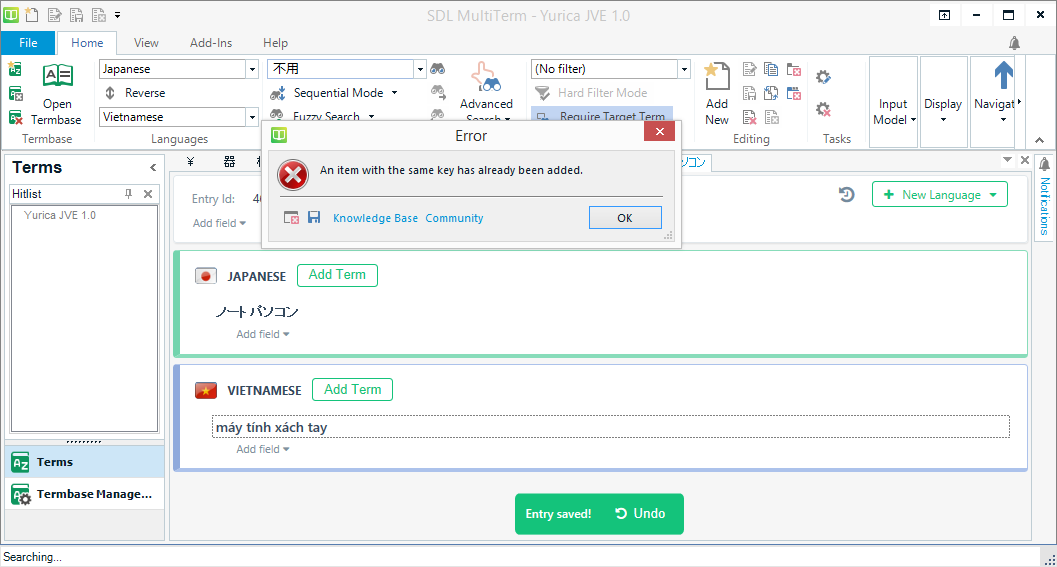
How to fix error "An item with the same key has already been added" in SDL MultiTerm

Error content: "An item with the same key has already been added" errror message when looking up a term in SDL MultiTerm
SDL MultiTerm version: 2017

Here's the error message:


Method to fix this error: Terminate SDL MultiTerm and then restart the program.
Knowledge Base Community: https://community.sdl.com/ then search for the message.

Create and utilize a translation memory in Trados

This article is about how to create and use a translation memory in Trados.
Trados version: SDL Trados 2017.

For creating a new translation memory in Trados, please see this.

内容:トラドスの翻訳メモリー(Translation Memory=TM)を作成して、翻訳したファイルを活用して現在のプロジェクトに利用する方法

Step 1: Create a new TM (translation memory) in Trados


Monday, June 25, 2018

Pre-order SDL Trados Studio 2019

Campaign ends at June 30th, 2018:


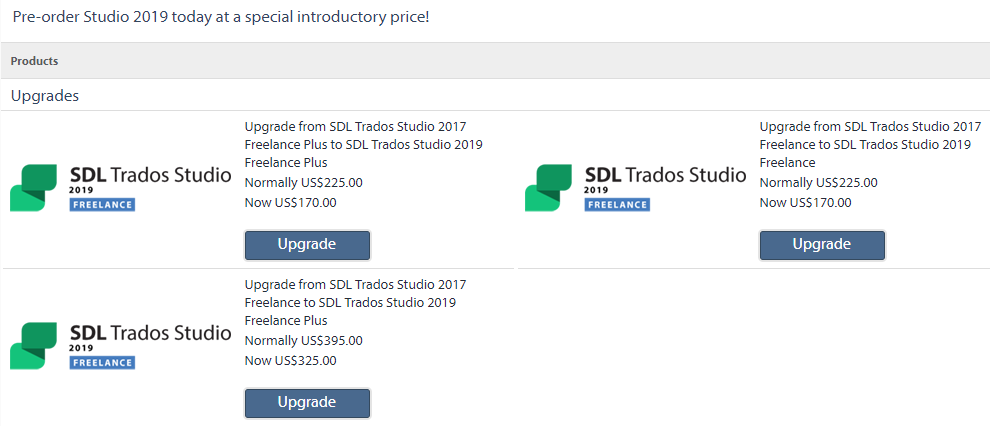
Here's the price to upgrade from SDL Trados Studio 2017 to SDL Trados Studio 2019 (pre-order):
Are you already using Studio 2017? Pre-order Studio 2019 with our special introductory pricing and get FREE AutoSuggest Creator + a FREE training webinar. From 160 € / US$170 / £140 / ¥24,000.

Promotions:
  • Upgrade from Studio 2017 to Studio 2019: From 160 € / US$170 / £140 / ¥24,000
  • Buy SDL Trados Studio 2017 (Freelancer): 695 euro => 495 euro
  • Buy SDL Trados Studio 2017 (Freelancer Plus - work on 2 PCs): 855 euro => 650 euro

Detail options:
  • Upgrade from SDL Trados Studio 2017 Freelance Plus to SDL Trados Studio 2019 Freelance Plus: US$225 => US$170, saving 55$
  • Upgrade from SDL Trados Studio 2017 Freelance to SDL Trados Studio 2019 Freelance: US$225 => US$170, saving 55$
  • Upgrade from SDL Trados Studio 2017 Freelance to SDL Trados Studio 2019 Freelance Plus: US$395 => US$325, saving 70$

The campaign ends at this June 30th. Source: Trados homepage.

Mark a Trados project as complete

趣旨:トラドスにおける翻訳プロジェクトを「翻訳中(In Progress)」の状態から「翻訳完了(Compete)」の状態にマークする

Even a Trados translation project has been finished, in project list it might be in "In progress" status, that means "being translated". You may wan to change its status to "completed".

To see projects and their status, click 'Projects' in the left pane:

Click 'Projects' to see the list of project and their status

To change "In progress" (being translated) to "Completed", right-click the project and then 'Mark as Complete':

Right click >> 'Mark as Complete'

Saturday, June 9, 2018

Utilize "Right Click Menu Key" for Trados translation

趣旨:
・右クリックメニュー表示の専用キーを活用してトラドスによる翻訳を効率化する (Utilize Right Click Menu Key to make translation work using Trados more efficient
・左手のマウス使用 (Using mouse with left hand)

When translating with Trados, I want to use mouse with my left hand and use Copy & Paste with my right hand. With "Ctrl C" and "Ctrl V" shortcut for Copy and Paste, it's quite inconvenient and inefficient since I'm using mouse with my left hand. It's awkward to press Ctrl C or Ctrl V with my right hand.

So here's the solution: Use "Right Click Menu Key" on the keyboard (Windows PC).

"Right Menu Key" lies between "alt" and "ctrl" keys

This button will show up the right menu:


You can use Up ↑ and Down ↓ key to choose Copy and Paste.

左手のマウス使用と右メニューキー

マウスは左手で使っています。(右手を保持するためです。)しかし、左手で右を使用するとCtrl C(コピー)とCtrl V(ペースト)が不便になります。

翻訳の効率をあげるには、「片手はマウス、残りの片手はコピー・アンド・ペースト」を徹底しなければなりません。

そうするには「右メニューキー」(上記の写真)を使います。テキストをマウスなどで選択し、右メニューキー(右クリックするとき表示されるめメニューを示すキー)をクリックしてUp ↑とDown ↓のキーでコピーやペーストが選べます。


長らく翻訳の仕事をする夢を叶えるために右手を過労から守りましょう。
Mark