(See the simplest way to add right-click menu to look up in customized dictionaries below - no need to code)
I want to add a right-click context menu in Chrome browser to search a selected word or phrase in my online dictionary, for example:
https://my.meonn.com/look.php?mylook=XXX
(This dictionary is for test only, not a practical one)
When I selected a word XXX in Chrome and right-click it, there will be an option to look up it in my online dictionary (URL above).
It's like 'Search Google for "XXX"' in this picture:
So I follow this tutorial Can I add right-click options in Google Chrome? to:
- Create a manifest file call "manifest.json"
- Create a html file call "yurica.html" (function script)
- Create icon files: "icon16.png" and "icon48.png"
"manifest.json"
高品質な・迅速な・安心できるベトナム語翻訳

DỊCH VĂN BẢN TÀI LIỆU KHÓ CHUYÊN MÔN CAO TIẾNG NHẬT * VIETNAMESE ENGLISH HIGH QUALITY TRANSLATION * DICTIONARY AND LANGUAGE TOOL DEVELOPMENT
Showing posts with label programming diary. Show all posts
Thursday, February 14, 2019
Using Javascript to copy selected word in my online dictionary
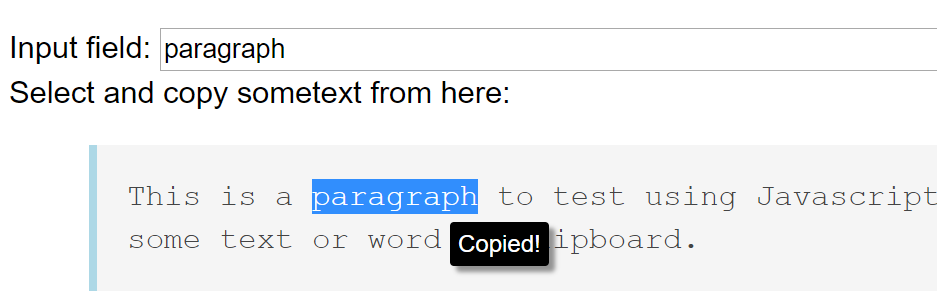
I want some text or word selected in my online dictionary to be put in the look up input field and copied to clipboard in order to look up that new word or phrase, and to copy to my offline Trados termbase (using SDL MultiTerm).
Demo:
Input field:
Select and copy some text from here:
This is a paragraph to test using Javascript to select and copy some text or word to clipboard.
Just select some text above and it will be copied to the input field.
DEBUG: It didn't work at the first time. The reason is I put the script before my PHP engine generates my HTML content (using like "<?php print $html; ?>"). Browsers will read this Javascript before my dictionary HTML content so nothing happens. To solve this problem, I put this script at the end of my dictionary PHP file.
This is the picture of what happen (in case Javascript does not work in your environment):
My Javascript code (see below for the original tutorial):