高品質な・迅速な・安心できるベトナム語翻訳

言語プロフェッショナルによる高品質なベトナム語翻訳
DỊCH VĂN BẢN TÀI LIỆU KHÓ CHUYÊN MÔN CAO TIẾNG NHẬT * VIETNAMESE ENGLISH HIGH QUALITY TRANSLATION * DICTIONARY AND LANGUAGE TOOL DEVELOPMENT
Showing posts with label unikey. Show all posts

Saturday, February 10, 2018

How to auto text Vietnamese words with Unikey

【要旨】Unikeyによるベトナム語のAutoText(参考のみ)

For example typing "Vn" for "Việt Nam", "Jp" for "Japan" using free soft Unikey.

Open control panel by right click 'V' or 'E' icon:


Check all options in 'Macro options' and click 'Macro table...' to open Autotext table editor:


Input values in boxes and click 'Add' button to add. If you want to replace an existing auto text shortcut, choose that entry, input new value pair and 'Replace' button.


Press 'OK' to save.

A file name 'ukmacro.txt' will appear in Unikey folder:


This is its content:
;DO NOT DELETE THIS LINE*** version=1 ***
jp:japan
sg:sài gòn
vn:việt nam
Now you can open a document etc. to test by typing jp, JP, Jp, vn, VN, Vn. Here's the result:
jp => japan
JAPAN => JAPAN
Jp => Japan
vn => việt nam
VN => VIỆT NAM
Vn => Việt Nam
The case of replaced word will match the case of the shortcut you type (i.e. Lower/Upper/Proper).

Bug

If you press 'Select file...' button, the app will crash and cause a little freeze to your PC. If you edit ukmacro.txt file, it will not work. This is obviously a bug but not seems to be fixed soon.

In most case of manual operation, ukmacro.txt file will be erased. That means you have to manually input each auto text shortcut and pay attention not to touch this file nor press any button.

I don't recommend you to use auto text (or 'macro') of this app.

Vietnamese IME: Unikey

【要旨】ベトナム語入力ソフトウェアUnikey、ベトナム語入力方法TELEX

What is Unikey?

Unikey is the most popular Vietnamese IME (input method editor) to input Vietnamese characters.

Official site and download: http://www.unikey.org/

This site is the only official site. Other ones are imposters.

Latest version (as of February, 2018): UniKey 4.2 RC4
UniKey 4.2 RC4, 32 bit, ZIP file: Build 140823 (197 KB). Supports 32-bit and 64-bit Windows 7, 8, 8.1.
UniKey 4.2 RC4, 64 bit, ZIP file: Build 140823 (229 KB). Supports 64-bit Windows 7, 8, 8.1.

How to install Unikey - most popular Vietnamese input method editor (IME)

Step 1: Download zip file of latest Unikey version from site mentioned above. Unzip it and you'll get two files: UniKeyNT.exe and keymap.txt.


Step 2: Double-click UniKeyNT.exe file to run Unikey.
This is a portable application and requires no installations.

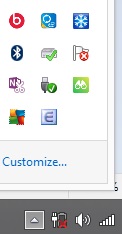
Unikey app icon will show up in taskbar like this with a dark-red 'V' letter:


You can start type Vietnamese now. To turn off Vietnamese typing mode (English typing mode), click app icon ('V' icon), it will change to a blue 'E' icon:


Step 3: Exit Unikey app.
To quit Unikey, right click app icon ('V' or 'E') and choose 'Kết thúc' (Finish).

Right-click > 'Kết thúc' to terminate Unikey

Explaining Unikey app